
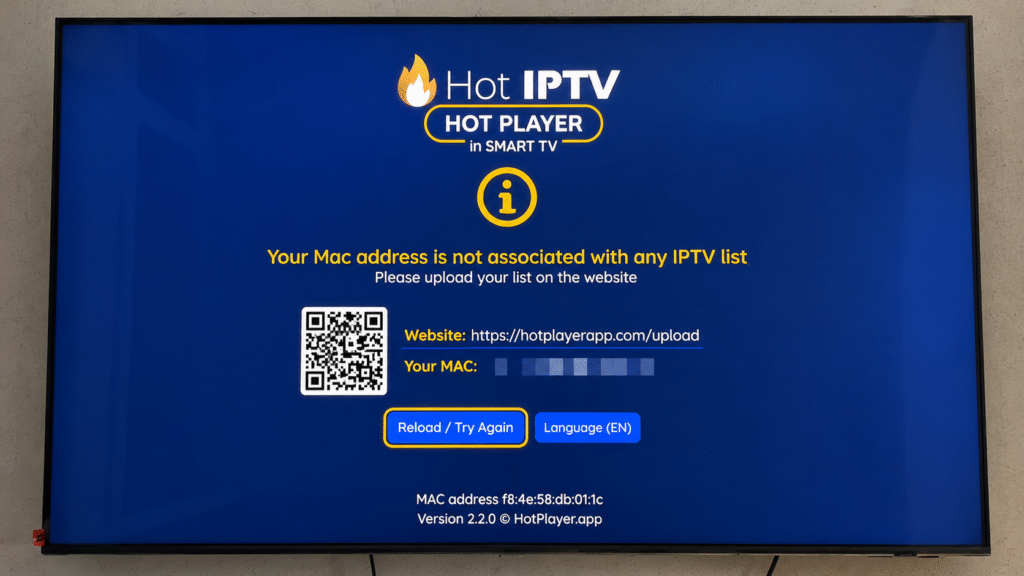
Samsung Smart TVs (running on Tizen OS) offer an amazing display for premium streaming, but to get the best experience, you need a high-performance media player. In 2026, the Hot IPTV app has become one of the most reliable, fast, and lag-free options for Samsung users.
This straightforward guide will walk you through the official installation process and show you how to connect your PureStream4K playlist in less than 5 minutes.
🎥 Watch: Hot IPTV Samsung Smart TV Installation Tutorial
🛠️ Step 1: Download Hot IPTV from the Samsung App Store
You do not need any external USB flash drives or sideloading tools. Hot IPTV is officially available in the store:
Turn on your Samsung TV and press the Home button on your remote control.
Navigate to the left and select the Apps icon.
Click the Search Icon (magnifying glass) at the top right corner.
Type “Hot IPTV” and select the official app from the results.
Click Install / Download. The app will appear on your TV home screen.
🚀 Step 2: Extract Your MAC Address & Link PureStream4K
Hot IPTV does not contain any content or preloaded channels. You must link your own subscription:
Launch the Hot IPTV app on your Samsung TV.
On the main screen, you will see a unique MAC Address (e.g., aa:bb:cc:11:22:33). Copy this address down.
Open a browser on your phone or computer and visit the activation site:
bookings.hotiptv.appEnter your TV’s MAC Address in the designated field.
Paste the M3U Link or enter the Xtream Codes credentials provided by PureStream4K.
Click Submit and refresh the app on your Samsung TV to load your premium 4K channels.
💬 Hot IPTV on Samsung Smart TV – FAQs
Q: Why is Hot IPTV not loading my playlist on Samsung TV? A: This usually happens if there is a typo in your M3U link or if your subscription has expired. Ensure you copy-paste your PureStream4K URL exactly without any trailing spaces. If the issue persists, clear the app cache or reload the playlist from the portal.
Q: Is Hot IPTV free on Samsung Smart TV? A: Hot IPTV provides a 5-day free trial period for testing. Once the trial ends, you will need to activate the app for a lifetime license by paying a small one-time fee on their official website. Note: This fee does not include channels; you still need a premium provider like PureStream4K.